Kayıtlar

android emulator etiketine sahip yayınlar gösteriliyor

Question on Lifecycle Events on Android

Resim
What is the order that the lifecycle events are called  after  the device is rotated ? onPause, onStop, onDestroy, onCreate, onStart, onResume Rotating the device causes the Activity to be destroyed and recreated, so our lifecycle starts at onPause and ends at onResume. Note that we don't see onRestart, which only happens if the activity is stopped (but not destroyed) and then restarted. More Info: When we use   onSaveInstanceState, We're missing onStop and onDestroy, because those states happen after onSaveInstanceState is called . We at least see the lifecycle all the way through onSaveInstanceState and you'll see that the TextView gets filled with more logs as you rotate the device more.
Android Debug Bridge (adb) Wireless Debugging Over Wi-Fi

Step 1 Make sure both your adb host computer and Android device are on the same Wifi network. Step 2 Connect the Android device with the computer using your USB cable. As soon as you do that, your host computer will detect your device and adb will start running in the USB mode on the computer. You can check the attached devices with  adb devices  whereas ensure that adb is running in the USB mode by executing  adb usb . 1 2 3 4 5 $ adb usb restarting in USB mode $ adb devices List of devices attached ZX1D63HX9R  device Step 3 Restart  adb  in tcpip mode with this command: 1 2 $ adb tcpip 5555 restarting in TCP mode port: 5555 Step 4 Find out the IP address of the Android device. There are several ways to do that: Go to Settings -> About phone/tablet -> Status -> IP address. Go to the list of Wi-fi networks available. The one to which you’re connected, tap on that and get to know your...

Android Emulator Shortcuts

1. Main Device Keys Home         Home Button F2             Left Softkey / Menu / Settings button (or Page up) Shift+f2     Right Softkey / Star button (or Page down) Esc         Back Button F3             Call/ dial Button F4             Hang up / end call button F5             Search Button 2. Other Device Keys Ctrl+F5     Volume up (or + on numeric keyboard with Num Lock off) Ctrl+F6     Volume down (or + on numeric keyboard with Num Lock off) F7             Power Button Ctrl+F3     Camera Button Ctrl+F11     Switch layout orientation portrait/landscape backwards Ctrl+F12     Switch layout orientation portrait/lands...

How to view the SQLite database on your Android Emulator

Resim
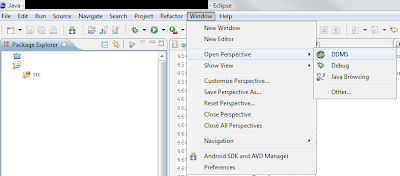
How to view the SQLite database on your Android Emulator This tutorial will show you how to open a SQLite datbase from your Android emulator. This requires Eclipse and the Android plugin. If you don't have them, follow this tutorial . This also requires a SQLite viewer. I used SQLite Database Browser . Step 1 With Eclipse open and your emulator running select the DDMS perspective by clicking on the Window -> Open Perspective -> DDMS menu option. Step 1 Step 2 Select the emulator you have currently have running.  Click the File Explorer tab Find the data folder. Step 2 Step 3 Follow the filepath to the application you want /data/data/your.app.namespace/dbname.db Click the Pull a file from the device button and save the database file on your computer. Step 3 Step 4 Open the SQLite Database Viewer and click Open Database.  Open the file and you can browse the data and view the schema! Step 4 This can reall...